Royal Holloway Marketplace
Textbooks, Furniture, Tickets, Housemates
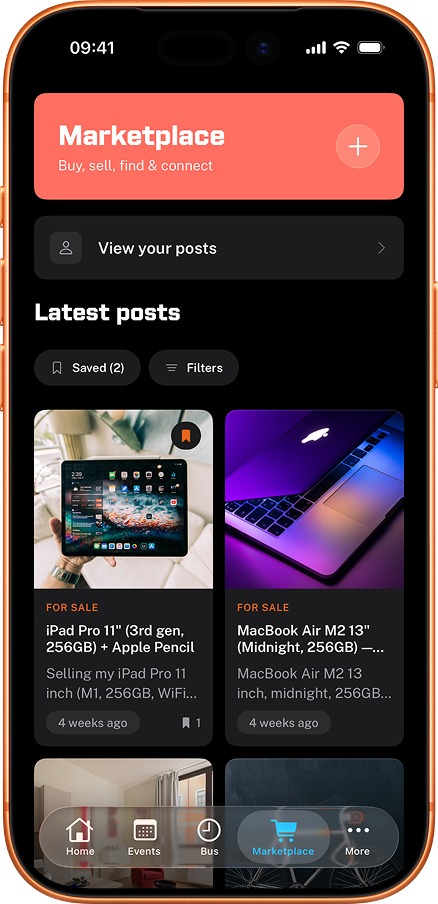
The student marketplace for Royal Holloway. Sell your second-year textbooks. Off-load the mini fridge before you leave halls. Find a housemate for next year. Post a spare ticket. Built for Royal Holloway, moderated, and free to list.
How it works
Up and running in seconds.
Browse or post
See what students are selling, sharing, or looking for.
Connect directly
Message the poster to arrange a meetup or ask questions.
Done
Sell that mini fridge. Find a study buddy. Simple.
Why people use it
Buy and sell
Sell textbooks, kitchen kit, furniture, clothes, bikes or lecture notes, with listings live for thirty days unless renewed.
Find housemates
Post when you're after a second-year house or a mid-year room swap, and connect directly with other Royal Holloway students.
An account to post, nothing to browse
Browsing is open to anyone. Posting needs a real account, signed in with Apple or Google, so every listing traces back to someone.
No listing fees
Posting and browsing are free, with no commission on what you sell and optional paid bumps to jump a listing to the top.
What people say
"Got a mini fridge off the marketplace for twenty quid. Absolute bargain."
"Sold my lamp in about 2 hours. Someone from Founder's came and got it."
"Found a study group for my module through here. We meet every week now."
"Posted my old textbooks and they were gone by the end of the day. Way easier than eBay."
Frequently asked questions
Do I need an account to post on the marketplace?
Posting requires signing in with Apple or Google. Browsing without an account is fine. Every post also goes through automatic moderation before it appears, and anyone can report a listing that slips through.
Is the marketplace free to use?
Free to browse and free to list. No listing fees, no commissions on what you sell. Optional paid bump credits exist if you want to push a listing back to the top, but the core marketplace costs nothing.
How long do listings stay live?
Thirty days by default. After that they expire automatically so the feed stays fresh. You can renew an active listing at any time, or repost an expired one in two taps.
How do I contact a seller?
Each post shows the contact method the seller chose to share (phone number, email, or Instagram handle). Tap the contact to message them directly. The app does not have an in-app chat.
What can I post on the marketplace?
Anything student-relevant: textbooks, course notes, furniture, kitchen kit, clothes, bikes, spare tickets, room swaps, housemate searches, lost and found. Categories help people find what they're looking for.
What is not allowed?
No alcohol or vaping, no controlled substances, no firearms, no live animals, no academic services that look like ghostwriting, no anything that breaks UK law or RHUL's student conduct code. The Terms page has the full list.
How do I start posting?
Sign in with Apple or Google from the Marketplace tab and you can post straight away. If you have been browsing without an account, anything you had saved moves across to the new account rather than being left behind.
Can I report inappropriate posts?
Yes. Every post has a report button. Reports get reviewed by a moderator and inappropriate content is removed, usually within a few hours during the day. Genuine bad-faith posters get banned and re-creating an account on the same device is blocked.
Why use this over the RHUL Buy & Sell Facebook group?
Every post here goes through automatic moderation before it appears, which the Facebook group does not do. It also has proper categories and search, listings expire on a sensible timeline, and there is a real reporting workflow. Many students use both.