Royal Holloway Bus Times
RHU and RH2 Departures, Counting Down
Both Diamond Bus services to campus, RHU and RH2, with every campus stop and every stop into Egham. Pin your favourites and see the next departure before you leave the room.
How it works
Up and running in seconds.
Open RHUL Mobile
Free on iOS and Android. No account needed.
Tap Bus Times
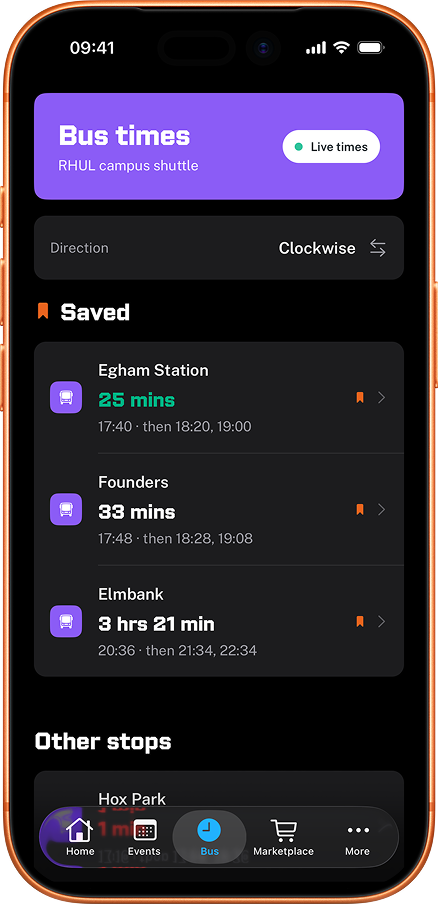
See every stop near campus with its next departures.
Watch the countdown
Minutes to the next bus, so you know exactly when to leave.
Why people use it
The next bus, counting down
Every RHU and RH2 stop on campus and into Egham shows its next departures in minutes, ticking down as you watch.
The RHU and RH2 services (Diamond Bus)
The RHU runs daily to Egham Station, and the RH2 runs weekdays to Huntersdale Campus. Switch between them in a tap.
Fare zones marked
Egham Station is the £1 fare zone and the rest of the RHU route is free, so the app labels each stop rather than leaving you to guess.
Save your favourite stops
Pin the stops you actually use and they sit at the top of the tab, synced across devices when you sign in.
A nudge before you need to leave
Set a reminder on any departure and the app notifies you about seven minutes before the bus goes.
Works offline
Timetables and stop locations are cached on your device, so the next departures still show when you have no signal.
Free, no account, no ads
No sign-up, no ads, no fee, just two taps from opening the app to seeing the next bus.
What people say
"Finally know when the bus is coming. No more standing in the rain."
"Actually accurate bus times?? I've been hurt before but this one's reliable."
"Saved Egham Station as my stop and now I check it every time before I head out. So simple."
"Used to miss the campus shuttle all the time. Now I know exactly when to leave my room."
Frequently asked questions
Where can I see the full RHU and RH2 timetable?
The Royal Holloway bus guide has both services written out: the RHU fare zones and 40 minute daytime frequency, the RH2 weekday pattern, first and last departures, and what happens over the term breaks.
Which Royal Holloway bus routes are covered?
The RHU service from Diamond Bus (Hox Park, Royal Holloway Founder's Building, Egham Station) and the RH2 service from Diamond Bus between Royal Holloway and Huntersdale Campus (Monday to Friday, free for RHU staff and students). Every stop within walking distance of campus is included.
Where do the buses stop on the Royal Holloway campus?
The main campus stop is at the Founder's Building, closest to the Picture Gallery and Founder's Dining Hall. Coming from Egham railway station on the RHU, get off there for most of campus. Every stop is on the campus map if you're working out which one drops you closest to your lecture.
How do I get from Egham station to Royal Holloway by bus?
Take the Diamond Bus RHU from the bay outside the station. It costs £1 flat, runs roughly every 40 minutes through the day and hourly in the evening, and stops at the Founder's Building before continuing to Hox Park. The app counts down to the next departure so you know whether to run for it. See the full Egham station to Royal Holloway guide.
Are the bus times live or a timetable?
They are the operator's published departure times, counted down to the minute from your phone's clock, so you always see how long until the next bus rather than a wall of times to read. The app also checks Diamond Bus for whether each service is running at all, so when the RHU or RH2 is on a term break it tells you instead of showing departures that will not happen. It does not track where individual buses are, so it cannot tell you a particular bus is running late.
Do the RHU and RH2 services run on weekends?
The RHU runs daily per the Diamond Bus timetable, including weekends, with fewer buses at quieter times. The RH2 to Huntersdale Campus runs Monday to Friday only. Both take a break over the Christmas, Easter and summer holidays. The app checks the operator daily, so out of term it tells you the service is not running and when it comes back rather than showing departures that will not happen.
Which stops does the RHU serve, and what does it cost?
Four stops: Egham Station, the Founder's Building, Elmbank Avenue and Hox Park. Egham Station is the £1 fare zone and every other leg is free, which the app labels on each stop. Elmbank Avenue is only served by evening buses after 20:00, so the app flags that too rather than sending you to an empty stop in the afternoon.
Can I get a reminder before my bus goes?
Yes. Open any departure and set a reminder, and the app notifies you about seven minutes before the bus leaves. It runs on your phone, so it still fires with no signal. You need to be signed in with Apple or Google to set one.
Is there a home screen widget?
Yes, on iPhone. The Next Bus widget puts your chosen stops on the home screen with their next departures, so you can check without opening the app. Pick up to four stop and direction pairs. It comes in small and medium sizes.
Can I save my favourite stops?
Yes. Tap the save icon on any stop to pin it. Saved stops appear at the top of the Bus tab in one place. Sign in with Apple or Google to sync your pinned stops across iPhone and iPad.
Does it work off campus, or offline?
It covers the RHU and RH2 stops on campus and into Egham. Timetables and stop locations are cached on your device, so departures still show with no signal, which is the usual state of things halfway down Egham Hill. For arrivals at random UK stops you want a national app like Citymapper.
How does this compare to the official Royal Holloway app?
The official Royal Holloway app, built on the Guidebook platform, links out to the static printed timetable on the RHUL intranet. RHUL Mobile turns the same timetable into a countdown to the next bus at the stop you actually use, adds the operator's running status, and puts it on your home screen.
Is it free? Do I need to sign in?
Yes, free. No account needed to see bus times, just open the app and tap Bus. Optional sign-in with Apple or Google syncs your saved stops across devices and lets you set departure reminders.